 The Boring Project
How Students Can Auto Apply for Internships
Students who auto apply for internships face a compressed season, repetitive forms and a mix of university portals and employer systems. This guide explains how to set up internship application automation so it saves time without lowering the quality of what you send.
Understand the season before you automate
Internship recruiting does not run year-round. Knowing the shape of the calendar tells you when automation earns its keep and when it is just noise.
The autumn rush and the spring trickle
Large employers, especially in finance, consulting and technology, post summer internships from late summer into autumn, and many fill them well before the year ends. Smaller companies, startups and non-profits post later, often in winter and early spring, and decide faster.
That gives two very different phases. In autumn, volume is high and deadlines are tight, so internship application automation helps you keep up. In spring, postings are fewer and more varied, so hand-picking matters more and automation mostly saves retyping.
Dates shift by industry and region, so build your own calendar from the programmes you care about rather than relying on a general rule. Most employers publish their timeline on the careers page a few weeks before applications open.
Why timing matters more than volume
Many large programmes review on a rolling basis. Applying in the first weeks after a posting opens puts you in a smaller pool than applying near the deadline. A tool that watches a defined list of employers and applies within a day of a new posting is more valuable than one that sends a hundred applications to whatever is listed in November.
Portals versus employer systems
Students have an extra layer that most job seekers do not: the university career portal. It changes where automation can and cannot operate.
What portals are good for
Handshake, Symplicity-based systems and institution-specific portals list roles that employers have specifically targeted at your school, including some that are not posted publicly. They also host on-campus interview schedules and information sessions. Use them for discovery and for roles where the portal is the only route to apply.
Automating inside a portal is a poor idea. Access is tied to your student identity, terms of use often prohibit automated interaction, and the consequences of a locked account land on you during the busiest weeks of the year.
Where the forms actually live
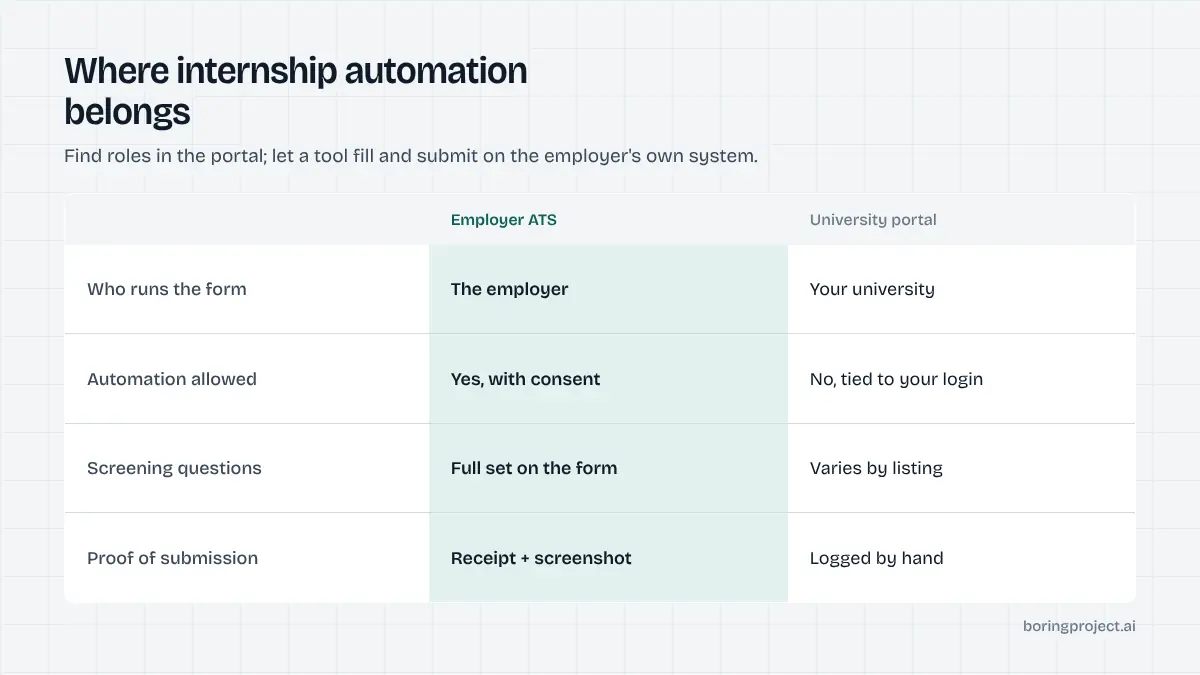
A large share of portal listings link out to the employer's own applicant tracking system. Big internship programmes commonly run on Workday, iCIMS, SuccessFactors or Taleo; technology companies and startups often use Greenhouse, Lever or Ashby. The form you fill is the employer's, not the portal's.
That is where automation belongs. Applying on the employer's system gives you the full set of screening questions, a confirmation page you can keep, and one canonical URL per role. Workday in particular has a multi-step flow with account creation that is tedious to repeat; our guide to how to auto apply on Workday covers the pattern.
A sensible division of labour
Use this split:
- Portal: find roles, note deadlines, attend events, apply only where the portal is the sole route.
- Employer ATS: let a tool fill and submit, with your approval on each application.
- Your calendar: track deadlines and interview slots, which no application tool does for you.
This split also keeps your tracking clean. Everything submitted on an employer system gets a receipt and a canonical URL; everything submitted through a portal gets logged by hand. Mixing the two without a shared sheet is how students end up applying to the same programme twice.
Keeping quality high while moving fast
If you auto apply for internships, the point is to send the same careful application faster, not to send a worse one more often. Three habits keep that true.
Consent on every application
Insist on a tool that shows you each application, or at least each day's batch, before it is submitted. For students this matters twice over. You are applying to a smaller set of large programmes where reputation across cycles can matter, and you are often still deciding what you want, so the review step is where you learn which roles you actually care about.
Unattended tools remove exactly that step. The broader safety questions are covered in is auto apply safe.
Accurate, stored answers
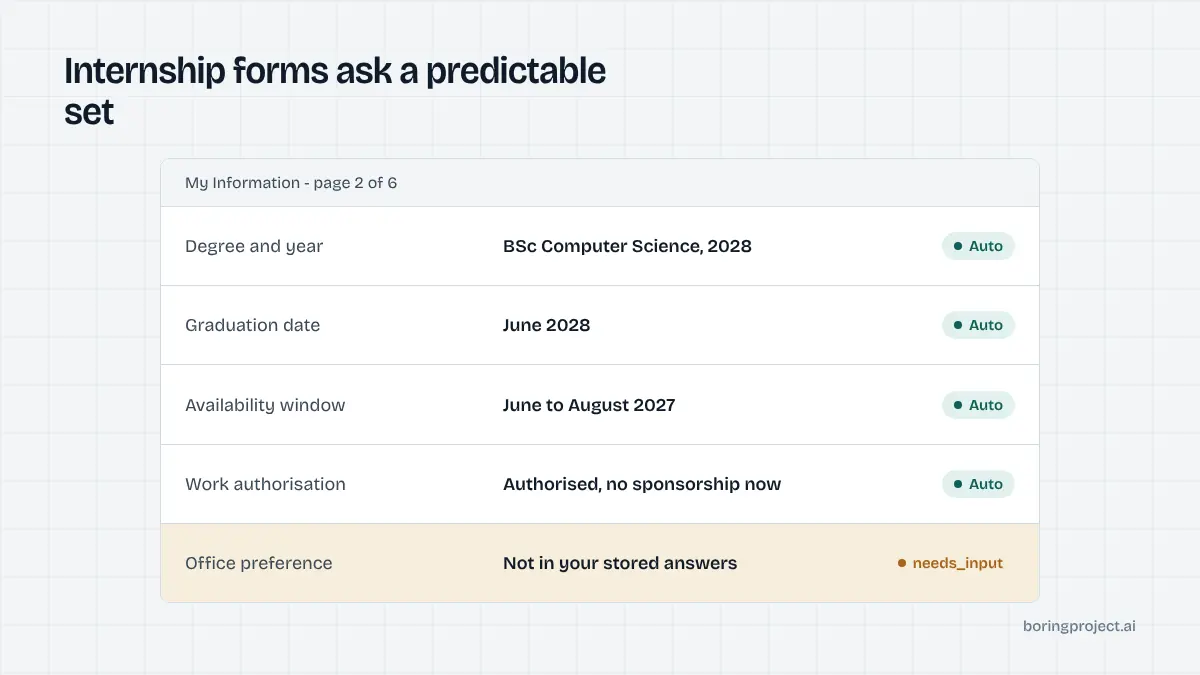
Internship forms ask a predictable set of questions: graduation date, degree and year, availability window, authorisation and future sponsorship need, sometimes GPA and office preference. Every one has a definite answer.
Write them once, check them carefully, and let the tool reuse them. Never let a tool guess a graduation date or a sponsorship answer to get through a form; those are the first things a recruiter verifies.
Fewer, better-targeted applications
Decide on two or three role types and the locations you would actually accept, and filter to those. Dozens of well-matched applications sent early will do more than hundreds sent indiscriminately, and they leave you time to prepare for the interviews they generate. Keep a single sheet of employer, role, date, status and reply, and review it weekly so you can see which programmes respond and adjust.
A last point on cover letters: skip optional ones unless you can write something specific. Reviewers at large programmes read many applications and recognise generic text quickly. An empty optional field is better than boilerplate.
Frequently asked questions
Is it a good idea for a student to automate internship applications?
It can be, if you use it to remove typing rather than thinking. Internship postings are seasonal and numerous, and the forms are repetitive, so automation saves real hours. The risk is applying indiscriminately. Keep a tight list of role types and locations, review each application before it goes, and treat the tool as an assistant, not a strategy.
Can automation apply through my university's career portal?
Usually not well. Portals such as Handshake or institution-specific systems often require a login tied to your student identity and have their own terms about automated access. Many employer listings on a portal also link out to the employer's own ATS. Use the portal to discover roles and to apply where it is the only route; automate on the employer's site otherwise.
How many internship applications should I send?
Enough to cover the roles you genuinely match and would accept, and no more. For most students that is a few dozen well-chosen applications per season rather than hundreds. Each one you send is one you may need to interview for and follow up on, and recruiters at large programmes notice repeat or scattershot applicants.
What screening questions do internship forms usually ask?
Graduation date, current degree and year, expected availability dates, work authorisation and whether you will need sponsorship after graduation, GPA where the employer asks, and sometimes location preference for multi-office programmes. All of these have definite answers. Store them accurately in your profile so the tool never has to guess.
Do employers mind if a tool submitted my internship application?
They mind the symptoms of careless automation: duplicates, answers inconsistent with the resume, generic free-text responses, and applications to programmes you are not eligible for. A tool that submits on the employer's own form with accurate answers and your consent is indistinguishable from a careful manual application and gives them nothing to object to.
Should I include a cover letter when automating?
Only when the posting asks for one or you can write something specific. A generic cover letter inserted everywhere does more harm than leaving the field empty, because reviewers at internship programmes see many applications and recognise boilerplate quickly. Let the tool skip optional cover letter fields and write the ones that matter yourself.
Next step
Career services teams and student-facing platforms that want to offer this kind of consent-based application automation to their students can talk to us about Managed Applies: candidates stay in control of every submission, screening answers are never fabricated, and each application returns a screenshot receipt.