 The Boring Project
7 Simplify Copilot Alternatives Compared
Simplify Copilot is a free autofill extension, not an auto-submitter, so the right pick from these Simplify Jobs alternatives depends on whether you want faster form filling, a cloud agent that applies for you, or a human doing the work.
Why people look beyond Simplify Copilot
Simplify Copilot does one job well: it fills repetitive application fields in your browser and leaves the submit button to you. That design is a feature for careful applicants and a limitation for anyone who wants volume. Our full Simplify Copilot review covers the extension in depth; this page is about what else exists.
You want the tool to submit, not just fill
Autofill saves typing but still costs a tab, a read-through and a click per application. If you are applying to forty roles a week, that overhead adds up, and it is the most common reason people search for alternatives. The cloud agents below remove the click entirely, at the price of less per-application control.
You want tailoring or coaching bundled in
Simplify's free tier is lean by design. Several alternatives bundle per-job resume rewrites, cover letters, interview practice or a human coach. Whether that is worth paying for depends on how much of your bottleneck is the form and how much is the material you put in it.
You are building a product, not running a job search
A small but growing group of people searching for Simplify Copilot alternatives are not job seekers at all. They run career platforms, staffing desks or job boards and need applications submitted for many candidates. A consumer extension cannot do that; a job application API can, and we cover that path at the end.
The three apply models you are choosing between
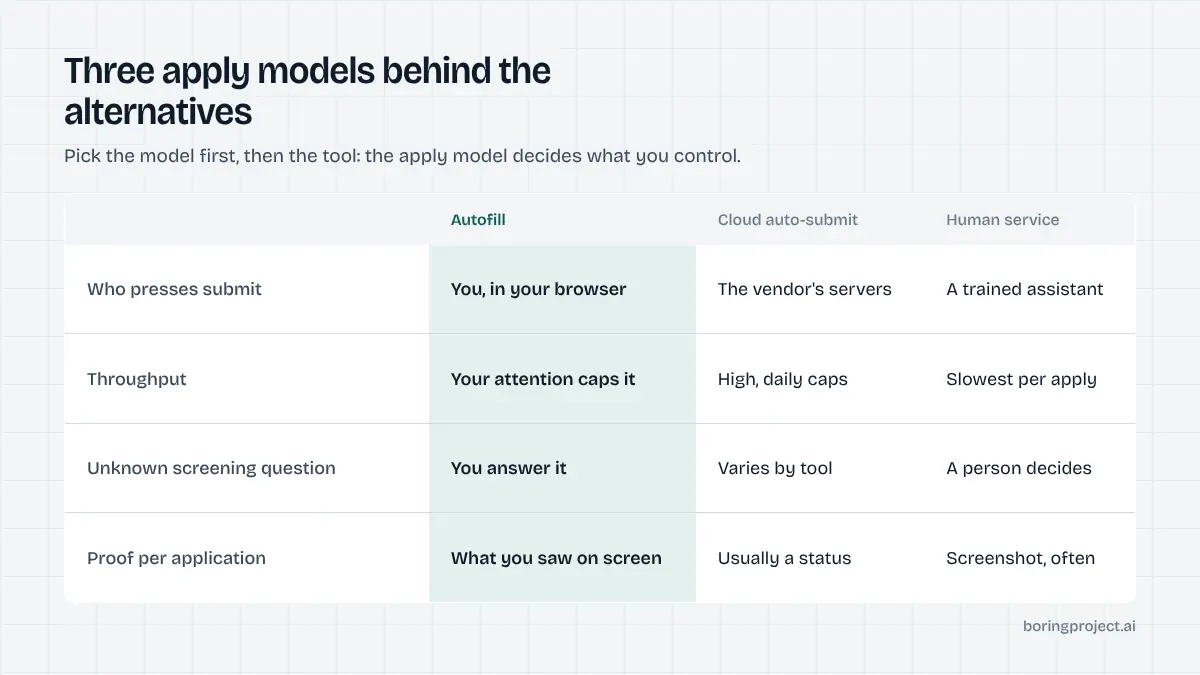
Every tool on this list fits one of three models, and the model matters more than the feature list. The distinction is explained in detail in our guide to auto apply vs autofill; the short version follows.
Autofill: you stay on the submit button
A browser extension reads the form, fills what it can from your profile and waits. You check the answers and submit. Nothing happens without you present, which keeps you accountable for every answer but caps your throughput at your own attention.
Cloud auto-submit: software applies while you are away
A hosted agent searches for matching roles, fills the employer's form on the vendor's servers and submits. Some let you approve each job first; others only let you pause or block employers after the fact. Volume is high, so match quality and screening-question handling become the things to check.
Human service: a person applies for you
An assistant or recruiter reads each posting, fills the form and submits, usually with a screenshot as proof. It is the slowest and most expensive model per application, but a human can handle odd forms and judgement calls software cannot.
Seven alternatives, by apply model
Descriptions below reflect each vendor's own site as of 2026, and the list covers the Simplify Jobs alternatives people most often shortlist. We have not invented ratings or user counts; check pricing pages directly because plans change often.
Autofill alternatives
Careerflow (autofill). Careerflow pairs a browser autofill extension with a LinkedIn profile optimiser and a job tracker. You remain the one who submits. The free Basic plan includes limited autofill, with Premium and Premium Plus tiers adding more usage and interview tools.
JobWizard (autofill). JobWizard is a Chrome extension aimed at ATS forms such as Greenhouse, Lever and Workday, filling text fields, dropdowns and custom questions before you review and submit. It also drafts answers to open-ended questions. Paid access is sold as non-renewing 30-day passes on top of a free tier with weekly limits.
Jobright (autofill, with an agent product). Jobright is primarily a matching and resume-tailoring platform with a one-click autofill for major ATS forms. Its site also references an AI agent for hands-off applying, so confirm which product you are signing up for. It is free to start, with paid features on top.
Cloud auto-submit alternatives
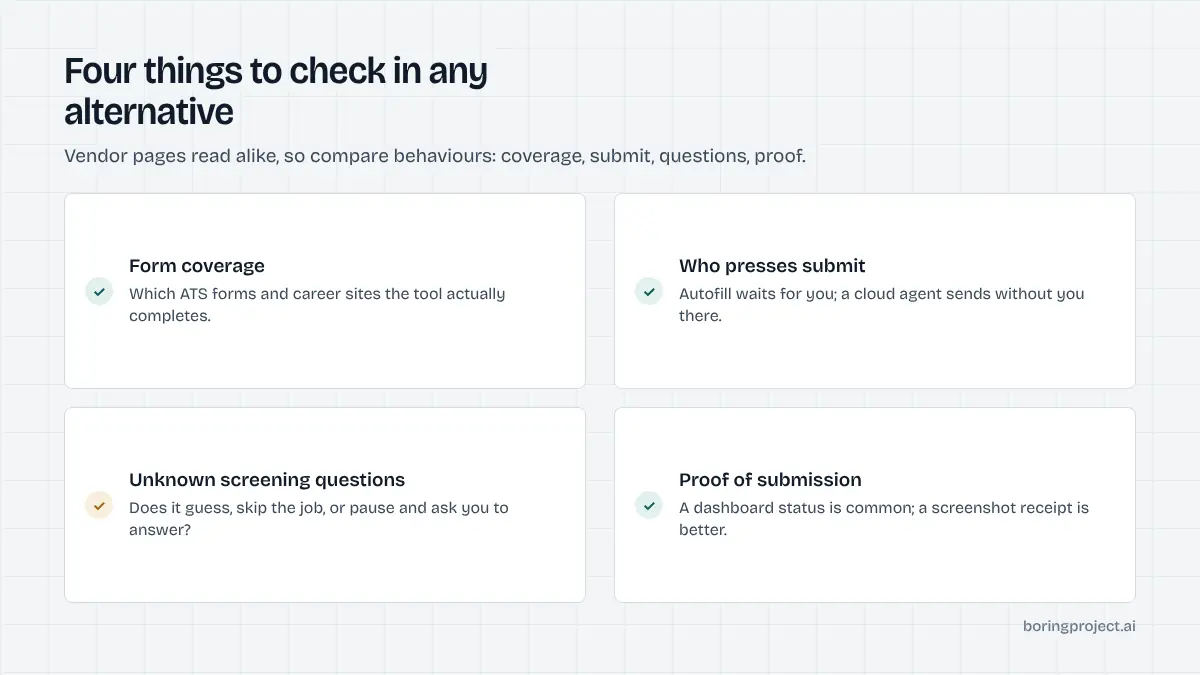
JobCopilot (cloud auto-submit). JobCopilot searches company career pages daily and fills and submits applications on your behalf, up to a daily cap. You can optionally check the tailored resume before it goes out, but the site does not describe per-application approval. It is sold as a subscription.
LoopCV (cloud auto-submit, with a manual-approve option). LoopCV runs "loops" by job title and location, then either auto-applies through ATS forms or lets you approve each match. It can also email recruiters directly. There is a free plan to start, and LoopCV sells to organisations as well as individuals.
FastApply (extension plus cloud). FastApply offers a Chrome extension with a co-pilot mode that pauses at each step and an auto-pilot mode that submits. Paid plans add "Apply for Me", which runs on FastApply's servers. It targets job boards such as Indeed and ZipRecruiter as well as major ATS platforms.
Human service alternative
Scale.jobs (human service). Scale.jobs assigns a trained human assistant who applies on your behalf and provides a proof screenshot for every application. Resumes and cover letters are tailored per job. Pricing works on credits with a one-time onboarding fee, per founder replies on their site.
Choosing between them. Match the tool to the constraint you actually have. If your problem is typing, stay with autofill and pick on form coverage. If your problem is hours, move to a cloud agent and pick on how it handles questions it cannot answer. If your problem is judgement on tricky forms, pay a human.
Job seekers should start free where they can. Careerflow, JobWizard, Jobright, LoopCV and Simplify itself all have no-cost entry points as of their sites in 2026, so you can test form coverage on the ATS platforms your target employers use before committing to a paid cloud agent.
Platforms and agencies are a different case. None of the consumer tools above expose their submission engine to other products, so teams that need applications submitted for hundreds of candidates, with consent captured per application and a receipt returned, are better served by API infrastructure built for that volume.
Frequently asked questions
Is Simplify Copilot an auto-apply tool?
No. Simplify Copilot is an autofill extension. It fills repetitive application fields in your browser and you press submit yourself. Simplify markets a separate Autopilot product that submits applications for you, so if you want hands-off submission you are really evaluating that product rather than Copilot. Most people searching for alternatives want either faster autofill or a cloud agent that submits on its own.
Which Simplify Copilot alternative is closest to the free autofill experience?
Careerflow, JobWizard and Jobright all offer autofill in a browser extension with a free tier, as of their sites in 2026. Each keeps you in control of the submit button. The differences are in surrounding features: Careerflow leans on LinkedIn optimisation, JobWizard on form coverage and email tracking, and Jobright on matching and resume tailoring.
What is the difference between autofill and cloud auto-submit?
Autofill runs in your browser tab and stops before submission, so every application still needs a click from you. Cloud auto-submit runs on the vendor's servers, finds jobs, fills forms and submits without you present. Autofill is safer for careful applicants; cloud agents trade control for volume. Read the apply model line for each tool before choosing.
Can a business or job board use these tools for its own users?
Consumer tools like Simplify Copilot are built for individuals and generally cannot be embedded in another product. Teams that need application volume for many candidates usually look at a job application API or a managed applies service instead, where submissions are tracked per candidate and consent is captured on every application. That is a different category from a browser extension.
Do any of these alternatives give proof that an application was submitted?
Human services such as Scale.jobs state that they provide a proof screenshot for every application, as of their site in 2026. Most consumer autofill and cloud tools show a dashboard status rather than a receipt. If verifiable receipts matter, check how each vendor documents submission before paying, or use an API that returns a screenshot per submission.
Are cloud auto-submit tools safe to use with my accounts?
They can be, but you should know what you are agreeing to. Cloud agents answer screening questions on your behalf, so review how each tool handles questions it cannot answer and whether you can pause or block employers. Tools that pause for your input on unknown questions are less likely to submit wrong answers in your name.
Next step
If you are building a job-search product, staffing workflow or job board and need applications submitted at scale, the Apply API takes a job URL and a candidate profile and returns a webhook with status and a screenshot receipt. Start with the job application API overview, or talk to us about Managed Applies if you would rather send a CSV.